

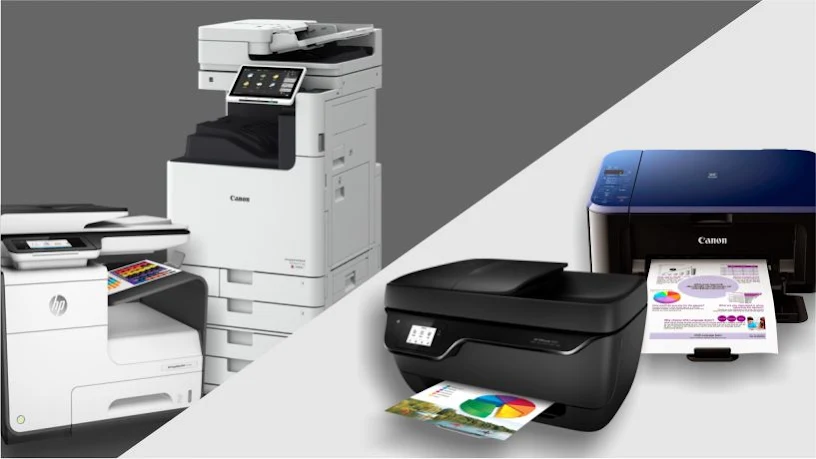
When setting up an office, one of the most common questions is: should you buy a standard printer or invest in a multifunction printer (MFP)? Understanding the differences between multifunction printers vs printers is essential for making the right choice for your business.
A standard printer does one thing—it prints. A multifunction printer, on the other hand, combines printing, scanning, copying, and often faxing into a single device . While both have their place, the best choice depends on your office size, workflow, and budget.
What Is the Difference Between a Multifunction Printers vs Printers?
Before comparing MFP vs printer, it’s important to understand what each device offers.
Standard Printer
A standard printer, also called a single-function printer, is designed solely for printing documents from a computer, smartphone, or network. It comes in two main types:
-
Inkjet printers – Great for color images, photos, and small offices
-
Laser printers – Use toner for sharp, fast, high-volume printing
Multifunction Printer (MFP)
A multifunction printer (also called an all-in-one printer) does more than just print. It can also scan, copy, and fax documents . MFPs are available as inkjet or laser models and range from compact desktop units to large floor-standing systems for enterprise use .
Multifunction Printer Advantages and Disadvantages
Understanding the multifunction printer advantages disadvantages helps you decide if an MFP is right for your office.
Advantages of Multifunction Printers
1. Space-Saving Design
An all-in-one printer vs single function printer comparison shows that MFPs save valuable office space. Instead of having separate devices for printing, scanning, copying, and faxing, you have one machine that does it all .
2. Cost Efficiency
While the upfront cost of an MFP is higher, the long-term savings can be significant. One device replaces three to four single-function units, reducing fleet size and overhead . For offices with high printing volumes, this can lower the total cost of ownership.
3. Streamlined Workflows
MFPs allow users to scan documents directly to email, network folders, or the cloud. This eliminates the need to switch between multiple devices and speeds up document workflows .
4. Enhanced Security
Modern MFPs come with advanced security features like pull-print authentication, PIN access, hard drive encryption, and audit logs. These are essential for businesses handling sensitive information .
5. Professional Finishing Options
Many MFPs include finishing options like stapling, hole punching, booklet making, and automatic collating—features not available on standard printers .
Disadvantages of Multifunction Printers
1. Higher Initial Cost
MFPs cost more upfront than single-function printers. Budget models start around $50-$100, but high-end MFPs can cost significantly more .
2. Larger Footprint
All-in-one printers tend to be larger and heavier than standard printers. The scanning bed adds height and weight, which can be a consideration for small workspaces .
3. More Complex to Maintain
With more components comes more potential for issues. MFPs may require more maintenance than standard printers, though service contracts can help .
Comparison Table – Multifunction Printer vs Standard Printer
| Feature | Multifunction Printer (MFP) | Standard Printer |
|---|---|---|
| Primary Function | Print, copy, scan, fax | Print only |
| Space Required | Larger footprint | Compact |
| Upfront Cost | Higher | Lower |
| Cost Per Page | Lower (bulk toner/ink) | Higher (especially ink) |
| Security Features | Advanced (PIN, encryption) | Basic or none |
| Finishing Options | Stapling, booklet, hole punch | Not available |
| Best For | Offices with diverse needs | Users who only need to print |
Should I Buy a Multifunction Printer or Normal Printer?
When deciding which printer is best for office, consider these factors:
Choose a Multifunction Printer If:
-
Your office regularly needs to scan, copy, or fax documents
-
You want to reduce device clutter and save space
-
You handle sensitive documents and need security features
-
You print high volumes and want a lower cost per page
-
You want professional finishing options for presentations and proposals
Choose a Standard Printer If:
-
You only need to print documents (no scanning or copying)
-
You have a limited budget
-
You have a small workspace
-
Your printing volume is low
Frequently Asked Questions
1. What is the difference between a multifunction printer and a standard printer?
A standard printer only prints, while a multifunction printer (MFP) can print, copy, scan, and often fax. The difference between printer and multifunction printer is primarily versatility .
2. What is the cost per page comparison between printer and MFP?
MFPs generally offer a lower cost per page, especially when using high-yield toner cartridges. Standard printers often have higher ink costs . The cost per page comparison printer vs MFP favors MFPs for high-volume printing.
3. Which printer is best for office use?
For most offices, a multifunction printer is the better choice because it combines multiple functions in one device. The question of which printer is best for office depends on your volume and needs, but MFPs are the standard for business environments .
4. What are the advantages of a multifunction printer?
Multifunction printers offer space savings, lower cost per page, enhanced security, and streamlined workflows. These multifunction printer advantages disadvantages make them ideal for most offices .
5. Should I buy a multifunction printer or a normal printer?
Choose an MFP if you need scanning, copying, or faxing. Choose a standard printer if you only print occasionally. The answer to should I buy a multifunction printer or normal printer depends on your workflow .
6. What is an all-in-one printer vs single function printer?
An all-in-one printer (MFP) prints, copies, scans, and sometimes faxes. A single-function printer only prints. The all in one printer vs single function printer comparison shows MFPs offer more versatility but cost more upfront .
7. Are multifunction printers more expensive to maintain?
MFPs may cost more to maintain due to their complexity, but service contracts can provide predictable costs. For high-volume offices, the overall cost is often lower than managing multiple devices .
8. Do I need a multifunction printer for a small office?
For a small office with 5-10 employees, an MFP is often the best choice. It saves space, reduces the need for multiple devices, and provides professional scanning and copying capabilities .
Final Thoughts
The choice between multifunction printers vs printers comes down to your specific needs. If you require more than just printing—scanning, copying, or faxing—a multifunction printer is the smart choice. For users who only print occasionally, a standard printer may be sufficient.
Trojan Technologies offers a wide range of printers and multifunction devices from trusted brands like Canon and Ricoh. We help businesses in Qatar find the right printing solution for their needs.
📞 Call: +974 4416 8660
🌐 Website: trojantechnologies.qa
📍 Serving businesses across Doha, Al Rayyan, Al Wakrah, and Lusail.